> ## Documentation Index
> Fetch the complete documentation index at: https://developers.cutshort.io/llms.txt
> Use this file to discover all available pages before exploring further.
# MCP Server
> Connect Claude, Cursor, or any MCP client to Cutshort
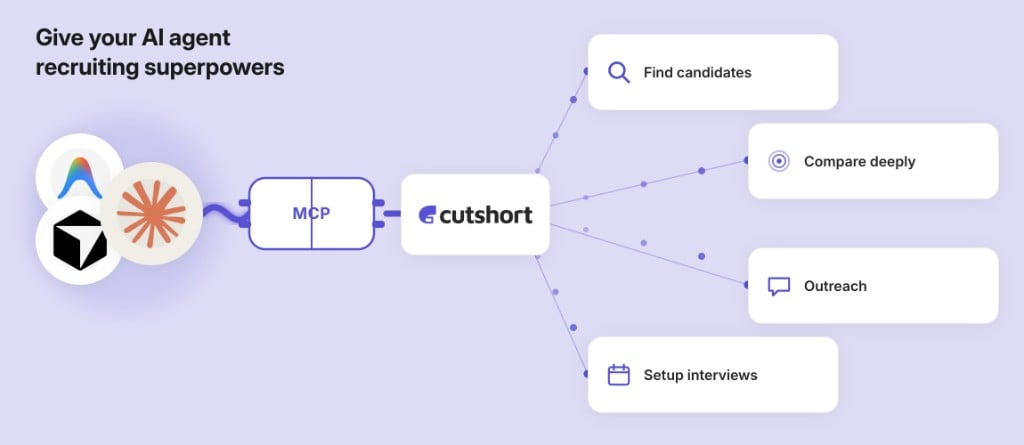 The Cutshort [MCP](https://modelcontextprotocol.io) server gives AI agents programmatic access to talent search, candidate detail, job posting, and outreach — using the same API key and quotas as the [REST API](/introduction).
**Endpoint:** `https://mcp.cutshort.io/mcp`
You need a Cutshort API key (`cs_live_…`) first. Approved employers can generate one at [Settings → Integrations → API Key](https://cutshort.io/profile/hiring-settings/integrations) — start with **Eval access**. See [Getting API access](/introduction#getting-api-access).
## Connect from Claude Desktop
Add to `~/Library/Application Support/Claude/claude_desktop_config.json` (macOS):
```json theme={null}
{
"mcpServers": {
"cutshort": {
"command": "npx",
"args": [
"mcp-remote",
"https://mcp.cutshort.io/mcp",
"--header",
"Authorization: Bearer cs_live_"
]
}
}
}
```
Restart Claude Desktop. In **Settings → Developer**, you should see **cutshort** listed with status **running**:
The Cutshort [MCP](https://modelcontextprotocol.io) server gives AI agents programmatic access to talent search, candidate detail, job posting, and outreach — using the same API key and quotas as the [REST API](/introduction).
**Endpoint:** `https://mcp.cutshort.io/mcp`
You need a Cutshort API key (`cs_live_…`) first. Approved employers can generate one at [Settings → Integrations → API Key](https://cutshort.io/profile/hiring-settings/integrations) — start with **Eval access**. See [Getting API access](/introduction#getting-api-access).
## Connect from Claude Desktop
Add to `~/Library/Application Support/Claude/claude_desktop_config.json` (macOS):
```json theme={null}
{
"mcpServers": {
"cutshort": {
"command": "npx",
"args": [
"mcp-remote",
"https://mcp.cutshort.io/mcp",
"--header",
"Authorization: Bearer cs_live_"
]
}
}
}
```
Restart Claude Desktop. In **Settings → Developer**, you should see **cutshort** listed with status **running**:
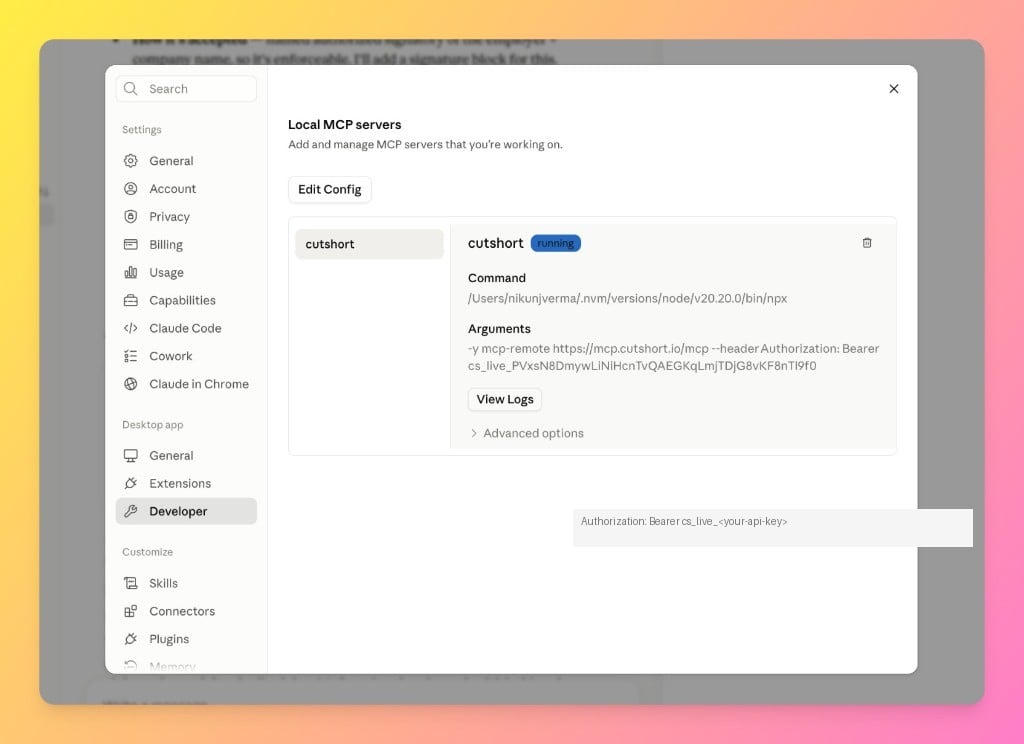 You should also see **cutshort** in the chat tool list. Requires Node.js 18+.
## Connect from Cursor
In **Cursor Settings → MCP**, add:
```json theme={null}
{
"cutshort": {
"url": "https://mcp.cutshort.io/mcp",
"headers": {
"Authorization": "Bearer cs_live_"
}
}
}
```
## Connect with mcp-remote (CLI)
```bash theme={null}
npx mcp-remote https://mcp.cutshort.io/mcp \
--header "Authorization: Bearer $CUTSHORT_API_KEY"
```
## Eval vs production keys
| | Eval key | Production key |
| --------------------------------------------- | --------------------- | ----------------------------------------- |
| Search & candidate detail | Yes (small quotas) | Yes |
| Post jobs, invite / send message, delete jobs | No | Yes |
| Typical use | Try MCP before buying | Full sourcing → outreach → follow-up loop |
Tool registration is scope-aware: the server reads `GET /capabilities` at connect time and only exposes tools your key can use.
## Available tools
| Tool | Eval | Production | Notes |
| ------------------------ | ---- | ---------- | -------------------------------------------------------------------------------------------------------------- |
| `get_usage` | ✓ | ✓ | Check quotas before bulk unlock |
| `kickstart_sourcing` | ✓ | ✓ | Recommended first step for a new search |
| `search_candidates` | ✓ | ✓ | Full filter control — see [Search guide](/guides/search-candidates) |
| `get_searched_candidate` | ✓ | ✓ | Auto-unlocks (1 credit) — confirm before bulk fetch |
| `list_jobs` | ✓ | ✓ | |
| `list_applications` | ✓ | ✓ | Default Applications stage; optional `stageId`; `autoUnlock` defaults to true (only sent stage is API-metered) |
| `get_job_stages` | ✓ | ✓ | Pipeline stages + counts — source of `stageId` |
| `post_job` | — | ✓ | Reviewed then live (\~30 min on business days) |
| `invite_to_apply` | — | ✓ | **First contact** invite — confirm first |
| `send_message` | — | ✓ | **Follow-up** in an existing thread (`threadId` from `list_applications`) — confirm first |
| `move_application_stage` | — | ✓ | Move application to another stage — confirm first |
| `delete_job` | — | ✓ | Soft-delete — confirm first |
### Messaging guidance
| Tool | Use when |
| ----------------- | --------------------------------------------------------------------------------------------- |
| `invite_to_apply` | Candidate is from search / talent DB and **not** yet in that job’s pipeline |
| `send_message` | Candidate already has a conversation (`threadId` from `list_applications` or invite response) |
Do not call `invite_to_apply` again for someone already invited or already in Applications — that returns **409**. Use `send_message` instead.
### Pipeline guidance
| Tool | Use when |
| ------------------------ | ------------------------------------------------ |
| `get_job_stages` | You need `stageId`s / counts across the pipeline |
| `move_application_stage` | Move a candidate after confirming with the human |
From **Applications**, only Shortlisted or Rejected are valid targets (`invalid_stage_move` otherwise). See [Move application stage](/guides/move-application-stage).
### Agent resource
At session start, agents can read **`cutshort://agent-guide`** — deep reference on search filters, profile signals, auto-unlock, pagination, and error codes. Same content as `GET /api/v1/agent-guide`.
## Starter prompt
Try this after connecting:
> I'm hiring a senior backend engineer in Bangalore, 4–8 years, strong on Go and Kubernetes, 25–45 LPA. Search Cutshort and show me the top matches with headline, experience, and a short fit reason from the resume text.
With a **production key**, you can extend the flow: post a job → `invite_to_apply` → `list_applications` → `send_message` / `move_application_stage`. See [Invite to apply](/guides/invite-to-apply), [Send a message](/guides/send-message), [Move application stage](/guides/move-application-stage), and [List applications](/guides/list-applications).
## Security
* Treat API keys like passwords — do not commit them or paste them in public chats.
* `get_searched_candidate` auto-unlocks locked candidates (1 credit each).
* Write tools (`post_job`, `invite_to_apply`, `send_message`, `move_application_stage`, `delete_job`) instruct agents to confirm with you before calling.
## Support
For API or MCP integration help, email [engineering@cutshort.io](mailto:engineering@cutshort.io?subject=Cutshort%20MCP%20support) from the email on your Cutshort account.
Source code: [github.com/CutShortHQ/cutshort-mcp](https://github.com/CutShortHQ/cutshort-mcp)
You should also see **cutshort** in the chat tool list. Requires Node.js 18+.
## Connect from Cursor
In **Cursor Settings → MCP**, add:
```json theme={null}
{
"cutshort": {
"url": "https://mcp.cutshort.io/mcp",
"headers": {
"Authorization": "Bearer cs_live_"
}
}
}
```
## Connect with mcp-remote (CLI)
```bash theme={null}
npx mcp-remote https://mcp.cutshort.io/mcp \
--header "Authorization: Bearer $CUTSHORT_API_KEY"
```
## Eval vs production keys
| | Eval key | Production key |
| --------------------------------------------- | --------------------- | ----------------------------------------- |
| Search & candidate detail | Yes (small quotas) | Yes |
| Post jobs, invite / send message, delete jobs | No | Yes |
| Typical use | Try MCP before buying | Full sourcing → outreach → follow-up loop |
Tool registration is scope-aware: the server reads `GET /capabilities` at connect time and only exposes tools your key can use.
## Available tools
| Tool | Eval | Production | Notes |
| ------------------------ | ---- | ---------- | -------------------------------------------------------------------------------------------------------------- |
| `get_usage` | ✓ | ✓ | Check quotas before bulk unlock |
| `kickstart_sourcing` | ✓ | ✓ | Recommended first step for a new search |
| `search_candidates` | ✓ | ✓ | Full filter control — see [Search guide](/guides/search-candidates) |
| `get_searched_candidate` | ✓ | ✓ | Auto-unlocks (1 credit) — confirm before bulk fetch |
| `list_jobs` | ✓ | ✓ | |
| `list_applications` | ✓ | ✓ | Default Applications stage; optional `stageId`; `autoUnlock` defaults to true (only sent stage is API-metered) |
| `get_job_stages` | ✓ | ✓ | Pipeline stages + counts — source of `stageId` |
| `post_job` | — | ✓ | Reviewed then live (\~30 min on business days) |
| `invite_to_apply` | — | ✓ | **First contact** invite — confirm first |
| `send_message` | — | ✓ | **Follow-up** in an existing thread (`threadId` from `list_applications`) — confirm first |
| `move_application_stage` | — | ✓ | Move application to another stage — confirm first |
| `delete_job` | — | ✓ | Soft-delete — confirm first |
### Messaging guidance
| Tool | Use when |
| ----------------- | --------------------------------------------------------------------------------------------- |
| `invite_to_apply` | Candidate is from search / talent DB and **not** yet in that job’s pipeline |
| `send_message` | Candidate already has a conversation (`threadId` from `list_applications` or invite response) |
Do not call `invite_to_apply` again for someone already invited or already in Applications — that returns **409**. Use `send_message` instead.
### Pipeline guidance
| Tool | Use when |
| ------------------------ | ------------------------------------------------ |
| `get_job_stages` | You need `stageId`s / counts across the pipeline |
| `move_application_stage` | Move a candidate after confirming with the human |
From **Applications**, only Shortlisted or Rejected are valid targets (`invalid_stage_move` otherwise). See [Move application stage](/guides/move-application-stage).
### Agent resource
At session start, agents can read **`cutshort://agent-guide`** — deep reference on search filters, profile signals, auto-unlock, pagination, and error codes. Same content as `GET /api/v1/agent-guide`.
## Starter prompt
Try this after connecting:
> I'm hiring a senior backend engineer in Bangalore, 4–8 years, strong on Go and Kubernetes, 25–45 LPA. Search Cutshort and show me the top matches with headline, experience, and a short fit reason from the resume text.
With a **production key**, you can extend the flow: post a job → `invite_to_apply` → `list_applications` → `send_message` / `move_application_stage`. See [Invite to apply](/guides/invite-to-apply), [Send a message](/guides/send-message), [Move application stage](/guides/move-application-stage), and [List applications](/guides/list-applications).
## Security
* Treat API keys like passwords — do not commit them or paste them in public chats.
* `get_searched_candidate` auto-unlocks locked candidates (1 credit each).
* Write tools (`post_job`, `invite_to_apply`, `send_message`, `move_application_stage`, `delete_job`) instruct agents to confirm with you before calling.
## Support
For API or MCP integration help, email [engineering@cutshort.io](mailto:engineering@cutshort.io?subject=Cutshort%20MCP%20support) from the email on your Cutshort account.
Source code: [github.com/CutShortHQ/cutshort-mcp](https://github.com/CutShortHQ/cutshort-mcp)